Log meals and training, then review patterns in caffeine, meal
timing, and consistency from your own records. Health data stays in
this browser unless you export it or use an Enhanced Feature.
Opens realistic sample data without changing your records.
By continuing, you agree to the Legal, Privacy & Data Use
notice.
Step 1 of 4
About you
Used locally to estimate what you burn. Optional Enhanced Features
send only the request context needed when you choose to use them.
Anything you like, or leave it blank. Never required.
The mode and age affect the calorie estimate. Female mode also makes
cycle tracking available. Changing mode later never deletes saved
cycle records.
Leave workouts out. They are counted separately when you tick a
workout done.
Step 2 of 4
What are you after?
This sets your starting target. Changeable any time.
Step 3 of 4
Your starting numbers
Estimates, not prescriptions. Adjust once you see how your weight
actually responds over two or three weeks.
What "App builds it" is based on
Your age, Gender mode, height, weight, daily activity and goal.
The day's Lighter / Typical / Active choice moves the target day
to day.
Steps you log do not change this number, on either option.
They're tracked in Progress only.
Pre-filled from your inputs above. Edit freely.
Worth reading once.
These numbers are general estimates from a formula, not medical or
dietary advice, and this app cannot know anything about your health.
If you have a medical condition or are pregnant, take medication, or
have any history of disordered eating, speak to a doctor or
dietitian before following calorie targets from an app. Exercise
suggestions carry the same caveat: if something hurts, stop and see
a physio rather than working around it here.
Step 4 of 4
Your training
So a plan can be built around what you actually have. All of it
stays editable.
What "App builds it" is based on
Where you train, your equipment, and how many days a week you
can commit.
Anything you mark to work around is left out of every workout
automatically.
Either way, you can swap any single exercise later from the
Workout tab.
Exercises loading anything you pick get left out. Skip if nothing
applies.
Sample data / Preview Mode
Health BS
Your latest changes are not saved.Keep this page open. Open Settings and create a backup before
closing.
A new version is ready.
Back to today
Richer logging, fuller workouts
Use it with your own API key
Today so far
0
kcal
What did you have?
Enter it manually
Today's record
Record history
▾
Photo attached. Ask what you want to know about it.
Next
Situations
This week
Plans
Back to today
Body
Highlights
Activity over time
Trends and summaries from your recorded data.
Calories
Last 7 days
Training
DoneScheduledExtraToday
Data sheet
▾
Settings
General
Appearance
Features you can turn on
Your profile
Targets and plans
Connected features
Your data
Help
Nutri
Log what you ate by typing it in plain language, entering it
manually, adding a photo, or asking how it compares to what you
have already had today. Track water, watch your calorie and macro
progress for the day, and mark yourself as trained.
Photos and screenshots: the camera button lets you take a
photo or choose one, including a screenshot of an order, a cart or
a menu. You never pick a type. Health BS works out whether the
image shows a meal, a nutrition label, a packet or a list of
items, and fills in what it can. Every name and amount can be
changed before anything is saved, and the numbers follow as you
change them. Only the food matters, so keep faces, names,
addresses, phone numbers and payment details out of the picture,
or crop them out first. Reading an image needs your own API key
and the photo permission in Settings.
Barcode scanning (test feature): point the camera at the
barcode on a pack, or type the number under it. The camera reads
the number on your device and only that number is sent, to Open
Food Facts, a public database, to find the product. It needs no
API key. Some products are missing or incomplete there, especially
in India, and the scanner does not work on every browser, so
compare the values with the pack.
Guide
Guide is for what comes next. One box takes any question: a food
check against what you have logged today, a workout or a swap, or
a question about your own record, such as your average protein on
training days or when you last weighed under a number. Questions
about your record, food checks from the built-in food list and
short sessions from the exercise library are worked out on your
phone without a key; other answers use Enhanced Features. Next
shows meals that fit what is left today, from foods you log, and
today's session. Situations covers eating out, a big dinner,
travel, a short session, a bad night's sleep and a missed
session, each with one answer. This week lists what stands out in
your record. Plans holds the meal plan, built from your targets
and your food preferences, which you can change in Settings. You
can also ask about a logged meal from its edit sheet, or about a
session from Workout.
Workout
See what is scheduled on any day, look back at what you did on
days that have passed, look ahead at your full week, mark a
workout done, swap out an exercise, or bring in a different
day's workout. Every exercise in the library has a built-in form
video, with no key needed. It starts muted so it plays straight
away on a phone; tap the speaker in the video for sound. If one
cannot play, the reason is shown with a button to watch it on
YouTube. Health BS can check those links about once a month when the
device is online if you turn on the monthly video library check in
Settings, and uses a reviewed fallback when one is available. You
can add your own link, open a focused YouTube search, or connect a
YouTube API key from the workout video screen.
Progress
Trends shows your BS Score, weigh ins, steps, waist and body
measurements, body composition, sleep, cycle records in Female
mode, BMI, and streaks. Body composition keeps the results from a
smart scale, a body scan or a gym machine, typed or filled from a
photo. The card shows each number with a small trend line, and fat
mass and lean mass are worked out from weight and body fat. The
sheet has Overview, Trends and Readings, grouped by month. It is
shown as numbers only, and readings from different devices are not
compared with each other. With a recent body fat reading, your
calorie estimate and protein range use lean mass; you can turn
this off under Nutrition targets. Sleep shows a daily seven day trend from the times you
enter. Cycle tracking separates confirmed period days from an
estimate based only on recorded period starts. When you switch
on sleep or cycle insights in Settings, a short pattern summary
appears under those cards. Explain in detail asks for an API key
and your consent first, and sends nothing until you have given both. Height and body
measurements can be entered in either supported unit while the
stored record stays consistent. Reports turns the same recorded
data into a statement for a day, a week, a month or 90 days. The
longer periods cover nutrition, training by body area, weight and
body composition, measurements, sleep, cycle in Female mode, what
your record shows side by side, and a comparison with the period
before. Side-by-side facts need at least 3 days on each side and
never claim one thing caused another. Save as PDF builds the
statement as a PDF file on your phone and saves it to your
downloads; nothing is sent anywhere. You can also share an image
and choose which sections go on it; sleep, cycle and body
composition start off.
BS Score: a 0 to 100 number built from your last 14 days.
It is based on how often you log, how close you stay to your
calorie target, whether you hit your protein range, and how often
you train. It is not a medical score, just a way to
see how your habits are trending.
BMI uses WHO adult reference bands: Underweight below 18.5, Normal
weight 18.5 to 24.9, Overweight (pre-obese) 25.0 to 29.9, Obesity
class I 30.0 to 34.9, class II 35.0 to 39.9, and class III 40.0
and above. WHO also publishes different action points for Asian
populations. BMI does not account for muscle mass.
Reports: a plain written statement built entirely from what
you have recorded, comparing this period to the one before it. You
can view it in the app, download it as a file, or share it.
Settings
Open it with the gear at the top. Search settings finds any
option by name, then takes you to it. Below the search: your name
and Night or Day mode, then your profile and units, your nutrition
targets, workout plan and cycle settings, Enhanced Features and
videos, and your data (backup, installing the app, privacy and
deleting everything). Gender mode, age,
feature permissions, record insight preferences,
and this guide are inside. Male and Female modes affect the calorie
formula and the Chest or Bust label. Female mode also shows cycle
tracking. Switching modes never deletes cycle records.
Popups and sheets
A popup keeps the screen behind it in place. Use its Close or
Cancel control, tap the shaded background where allowed, swipe
down from the handle, or use the phone Back button. When popups
are layered, only the one on top closes.
References and record labels
Health references in Settings explain the source, intended
population, and limits behind calorie, macro, nutrient, BMI,
workout, sleep, and cycle figures. Record History and reports
separate what you entered from calculations and estimates.
Settings controls whether sleep and cycle records may be used for
insights. Detailed explanations also require their individual
Enhanced Feature permission and only run when you tap Review
pattern or Explain in detail. Connected requests use the fields shown beside each
permission; stored written notes are left out.
Personal Health BS data and backups stay on this device unless you
export them or choose an Enhanced Feature. Static app files may be
cached for normal operation; they contain no health data or API
key.
Backup & Restore
Save a file to move everything, including sleep and cycle records
and saved workout video links, to another device. Your saved API
keys are never included. Record insight preferences and Enhanced
Feature permissions are included, but cannot make a connected
request without the matching key on that device.
The selected backup replaces the current local Health BS records
only after confirmation. Gemini and YouTube keys are not included.
Paste backup text copied from an earlier version of this app, or
from another device, to bring that data in. You can also copy
this app's own data as text the same way.
Restoring applies instantly. Connected features stay off until
you switch them on again in Settings.
This device
Explore the full app with fictional sample data. Your real
records, key, and backups stay untouched.
Delete all local app data and withdraw consent
Deletes locally stored Health BS data on this browser/device and
returns to setup. Browser history, downloaded reports, device
backups, and information already sent directly to Gemini are not
erased by the app.
What's stored, what Enhanced Features send, and the privacy,
data-use, and wellness notices, all in one place.
Targets here are general estimates, not medical advice. Speak to a
doctor or dietitian before making significant changes to how you eat,
especially with any health condition or history of disordered eating.
By RRS · For Friends & Family
Edit entry
Edit the meal contents. Nutrition will be recalculated when you
save.
Edit exercise
Edit workout
Choose a focus. It will use your saved location, equipment and
work-arounds.
The same symptom logged on similar days across a few cycles starts showing a pattern in Cycle pattern insights, on Progress.
Physical
Skin and hair
Digestive
Energy and sleep
Emotional
Discharge
Fertility signals, optional
Shown because Fertility awareness method is your current method. Logging these narrows the fertile-window estimate on the Cycle hub.
Cervical mucus
Ovulation test
Today's method
Intimacy, optional
Cycle estimates use recorded period starts only. Most adult cycles are
21 to 35 days, but personal patterns vary.
American College of Obstetricians and Gynecologists. Predictions are not contraception and do not identify pregnancy.
Cycle
LoggedEstimated periodFertile window
Late period
Log a test
Test history
What a late period can mean
Many things can delay a period, including stress, a change in weight or exercise, illness, travel, certain medications, thyroid changes, PCOS, breastfeeding, perimenopause, and pregnancy.
NHS.
A home urine test is most reliable from the day of a missed period onward; testing earlier can miss a real pregnancy.
U.S. Food and Drug Administration.
Contact a clinician for a period that is very late or absent, or for severe pain or heavy bleeding, whatever a test shows.
Last period start
Used to estimate weeks and a due date. Editable any time.
Pregnancy
A due date from a clinician overrides the estimate from your last period.
Today
Bleeding or spotting is always worth mentioning to a clinician.
Only changes how the fertile-window estimate on the Cycle hub is worded. It never turns anything on or off.
Both are local display choices, applied instantly. Turning either off
only hides the field; anything already logged stays on this device.
Insights and sharing
Cycle pattern insights, comparisons, and the separate intimacy and
method context permission live in Enhanced Features, alongside every
other connected feature.
Nothing here changes where the Cycle section sits in the app. It
stays inside Progress, named plainly, like every other tracker.
Choosing a method closes the current history entry and starts a new
one from today. This never sends anywhere unless Enhanced Features'
intimacy and method context permission is switched on.
Long-acting
Daily or scheduled
Used each time
Fertility awareness
Permanent
Other
History
Effectiveness reference
Percent who become pregnant within a year. A dash means that figure
was not independently confirmed.
MethodTypicalPerfect
Before you start
What it estimatesNext period, cycle phase, and a fertile window, all from the period days you confirm. Every estimate is a range built from your own records.
What it isn'tNot contraception, not a fertility diagnosis, and not medical advice. It never identifies a single fertile day with certainty.
What stays privateEverything here stays on this device by default. Mood, intimacy, and method context are separate, off-by-default choices in Cycle settings and Enhanced Features.
Where to find it againOpen Cycle from the Progress tab any time. Settings and method history are one tap away from there.
Log from a photo
Add a photo
A meal, a nutrition label, a packet, or a screenshot of an order or
menu. Health BS works out which it is, and you can change anything
before it is saved.
Keep personal details out of the pictureLeave out faces, names, addresses, phone numbers and payment or
account details. Crop them out first if they are in the image.
Only the food matters here.
Save or share
Your device didn't offer a share sheet for images. Long-press the
picture below to save or share it.
Build your plan
Five short steps, then your week is built. Everything stays editable.
Who builds your plan?
What "App builds it" is based on
Where you train, your equipment, and how many days a week you can
commit.
Anything you mark to work around is left out of every workout
automatically.
Either way, you can swap any single exercise later from the
Workout tab.
Where do you train?
This decides which exercises can go in your plan.
Bodyweight is always included. Pick anything else you own.
How many days can you realistically train?
Pick what you can keep up. You can change it any time.
Which days?
Tap a day to mark it training or rest. Leave this alone and the
days above are chosen for you.
How should the week be split?
Not sure? Balanced suits most people.
Anything to work around?
Skip this if nothing applies.
Exercises loading anything you pick will be left out. Skip this if
nothing applies. This is not medical advice; see a physio for a real
problem.
Your week
Check it over, then save. You can swap any exercise later.
Fine-tune the split
0
0
0
0
0
0
Swap exercise
Add exercises
Pick a body part, then tap the ones you want.
Bring in a workout
Copy a workout onto this day. Copies are independent, so later edits
to the original will not change it.
Calories burned
If your watch or band gave you a figure, use it. It replaces the
estimate for this day only and feeds into both maintenance and your
target.
Shopping list
Log from recent meals
Tap an item to log it again, right now.
Are you sure?
Workout video links
Add a YouTube link to any exercise in the library. It stays with your
local app data and is included in backups.
Built-in links needing attention
Choose an exercise below to add a working link.
Saved video links
YouTube video search
Connect a YouTube API key only if you want Find another video to
search inside Health BS. You can always use Search YouTube without a
key.
YouTube API key
Stored only on this device. It is not included in Health BS backups.
About you
A calculation mode, not a question about gender identity.
Why this matters
It affects the calorie formula, the Chest or Bust measurement
label, and cycle-feature visibility. It never changes BMI, steps,
water, your sleep records, or your own target values, and it never
produces stereotyped workout or food advice. If you use an Enhanced
Feature that needs it, the mode is included in that request so the
answer can fit you. Switching to Male mode hides and blocks cycle
use without deleting cycle records or saved cycle preferences.
Body
Used for your calorie and macro targets. Day-to-day weigh-ins are
logged separately in Progress.
Age, height, weight and daily activity feed the calorie estimate. They
never change BMI, water, steps, sleep, or your own target values.
Measurements
Nutrition targets
Lean mass
Targets
Who sets your calorie and macro numbers?
What "App builds it" is based on
Your age, Gender mode, height, weight, daily activity and goal,
recalculated any time they change.
The day's Lighter / Typical / Active choice moves the target day
to day.
Steps you log do not change this number, on either option. They're
tracked in Progress only.
Water stays in ml or L, food in g, energy in kcal and time on the 24 hour clock. Your records are stored in one unit and shown in the one you pick, so switching never changes what you logged. Applies instantly.
Enhanced Features
Optional features that use a connection key of your own for richer
food recognition, deeper guidance, and fuller workout planning.
Health BS works fully without one.
Not sure? Choose Gemini. Either way, it uses a key you supply
yourself, and requests go straight from this browser to that
provider.
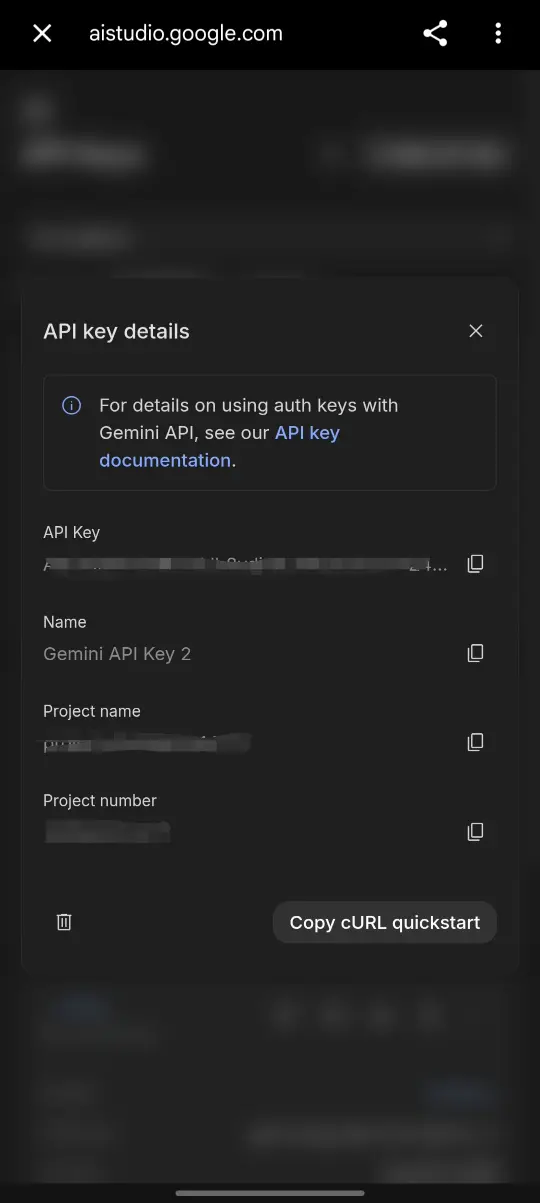
Come back here and tap Paste. It is checked straight away
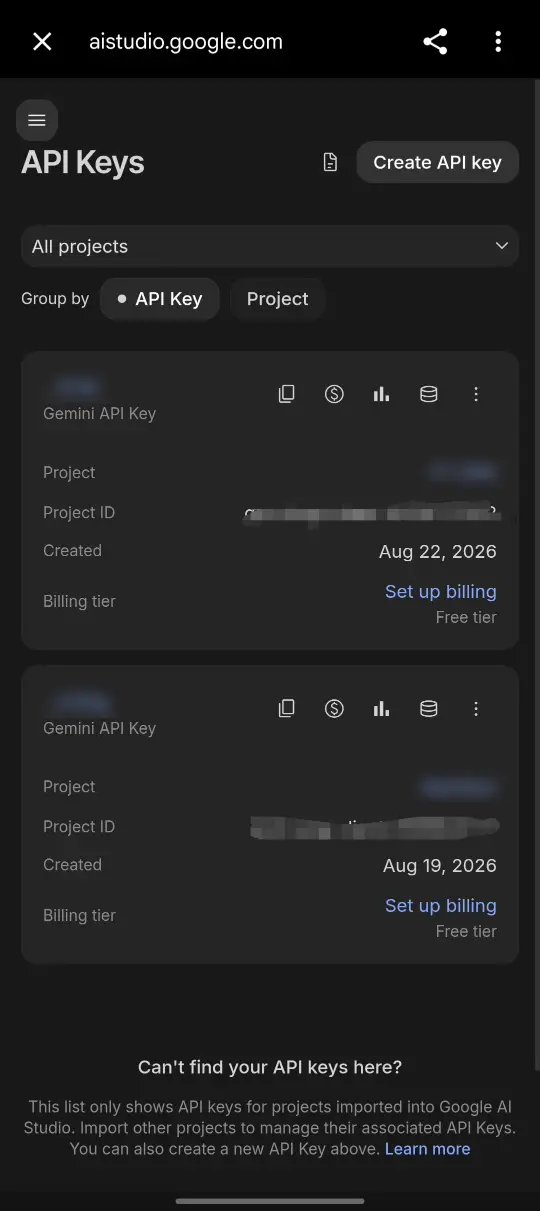
On the API Keys page, tap Create API key.
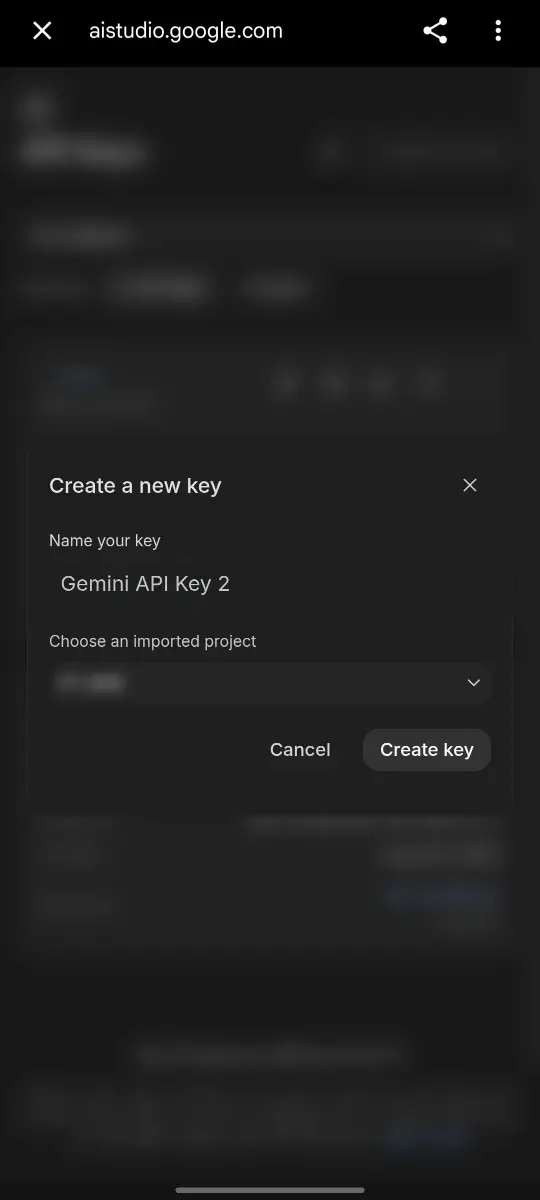
Keep the suggested name and tap Create key.
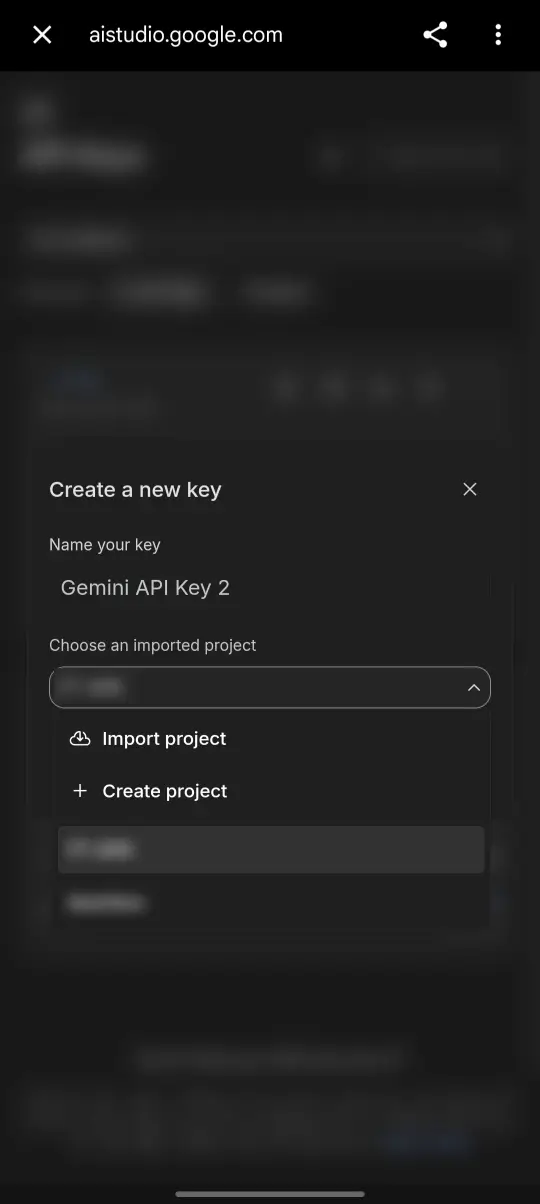
No project in the list? Open it, tap Create project, then choose it.
Tap the copy button beside the key, then come back here and tap Paste.
Stored only on this device and used only when an Enhanced
Feature sends a request. Google account, project, quota,
billing, and current Gemini API terms govern data use.
Use a key from Google's free tier, which needs no card, or set
a spending limit on your Google account, so a key can never
cost more than you choose.
Use Automatic unless the connection needs another option.
Come back here, paste it above, and test the connection
Stored only on this device and used only when an Enhanced
Feature sends a request. Your OpenRouter account, credits,
and OpenRouter's terms govern data use, not Health BS.
Set a credit limit on the key at OpenRouter, so it can never
cost more than you choose.
Free is used unless you choose another. Every model listed
reads photos and works with every Enhanced Feature. The cost
shown is what OpenRouter charges your account for one photo;
typed meals and questions cost less.
Applies instantly.
Choose where the connection helps
Sleep and cycle records
Applies instantly. When a permission is off, the built-in version
continues. Photo and suggestion buttons stay visible, and explain what they need when you tap them.
Insights from your records
Choose how your records can be compared. Applies instantly. Turning an
option off never deletes a record or removes it from reports. These
are permissions only; results appear in Progress and Guide, not here.
Cycle comparisons
Cycle options are active only in Female mode. A comparison needs at
least 3 days on each side, shows averages from your own records, and
does not say why they differ. Nothing here predicts fertility,
pregnancy or contraception, and nothing changes your targets.
Videos
Every exercise has a built-in form video. None of this needs a key.
Library check
Applies instantly.
Saved videos
Applies instantly.
About
Health BS: On the Record · v3.21.3 · private pre-release by RRS
What changed in this version
Guide shows a waiting card with what was sent while an answer is on its way. Before that, logging a meal shows one spinner, water is one line with a small amount box, and a switch that is on is a softer green. Before that, water had two lines, error messages sit in a faint red box with plain text, Change date is a button, and the sleep and cycle choices fit one line each. Before that, every text box is one size and easy to tap, small buttons became the standard chips, under, on target and over show only on bars and the gauge, and the main numbers in Reports, Body composition and the Data sheet share one style. Before that, the tab bar labels no longer blink when you change tab, and Guide and Progress open a little faster. Before that, buttons keep their space when something new appears, swiping a row of chips no longer changes tab, time pickers use am and pm, Workout ends in one card of options, Settings rows read title first, the alias has a clear text box, and the key steps have pictures. Before that, a ready meal plan is grouped by week and day, each folding open in place, with why each day looks the way it does. Text, colour, buttons and card headers follow one design standard on every screen. Before that, icons are sharper and the offline copy is set up as soon as the app opens. Before that, the meal plan setup is one screen of three questions, with every other option under More options. Before that, portions are realistic and easy to change: size words are understood, Small, Usual and Large sit under the log box after logging, the app learns your usual sizes, and your katori size can be set. Text looks the same on every screen. Before that, typing a meal works far better without a key, with about 1,300 foods including McDonald's India items, plans draw on 274 meals, and the exercise library adds cardio, sports, yoga, mobility and a full gym set. Before that, the meal plan asks your preferences, plans each day to its own target, and comes with swaps, a shopping list and Plan again. Before that, security is tighter: the app runs only its own code, saved keys are no longer shown in full, and backups are checked more strictly. Before that, a backup file can be shared straight to the app to restore it. Before that, the app opens with its pulse, cards sit raised, taps and screens move like an app, OpenRouter models are chosen from a list with a free one as the default, and key fields no longer set off the browser's password prompt. Before that, the BS Score and training suggestions follow your plan, averages count days with two or more logs, weight trends ignore a single odd morning, your own calorie target can add training burn, and photo logging uses the numbers printed in the image, with a choice of sizes. Before that, slow answers and barcode lookups stopped failing and the app opens without a connection. Before that, the app started showing when it is working on something, logging a meal offers Undo, a top bar holds the date while you scroll, and 40 more exercises have a built-in video. Before that, more exercise names in plans found their video, such as Dumbbell Overhead Extension and Farmer's Walk. Before that, exercise videos started muted so they play straight away on phones. Before that, Save as PDF started making the file on your phone, with no print window, and reports gained a week, month and 90-day view with new sections, a share image you choose the contents of, and charts in the PDF. Before that, Guide was rebuilt around what comes next: one question box, Next, Situations, This week and Plans. Food preferences moved to Settings. Before that, body composition got its own Progress card with trend lines, fat mass
and lean mass, and a sheet with Overview, Trends and Readings.
Calorie and protein targets use lean mass when there is a recent
body fat reading. Earlier: the camera button takes a photo or lets you pick one, including a
screenshot of an order or menu, and works out what it shows. A
barcode scanner (a test feature) finds packaged products, and
Progress has a new Body composition card. Videos that cannot
play in the app switch to another one or open on YouTube.
Before that, Workout gained a date header with arrows and a calendar, like
Nutri, so past and future days are both reachable. Settings is
one page with no Save button; changes apply as you make them.
Weight and distance units can be shown in kg/lb and km/mi. The
camera can read a nutrition label as well as a plate of food,
and an amount you change updates the numbers at once. You can
now choose OpenRouter as well as Gemini for optional connected
features, each with its own key.
User guide
Data controls
Legal and privacy
Food preferences
Used by food answers, meal suggestions and meal plans in Guide.
Changes apply straight away.
Diet
Foods you avoid
For an allergy or a strict avoid list, treat suggestions as
guidance only and always check the ingredients yourself.
Focus
Your katori, bowl and glass
Share image
Record summary
Built from what is actually on the record over the last couple of
weeks: meals, caffeine, protein, and training. No pattern here that
you did not log yourself.
Health references
How Health BS calculates and interprets its health numbers.
Your connection is ready. These features are now on:
Sleep and cycle insights are off. You can switch them on in Enhanced Features when you are ready.
Your day at a glance
Legal, Privacy & Data Use
This notice explains what Health BS stores locally, when an optional
feature sends a request to an AI provider you choose, and the
limits of this personal wellness tool.
At a glance
Health data is stored locally in this browser unless you export a
backup or choose an Enhanced Feature. Enhanced Features use a
connection key you supply yourself, to a provider you choose: Gemini
or OpenRouter. When you use one, the relevant request context goes
directly from this browser to that provider's API using your own
key. No Health BS-operated server receives or stores those requests
or responses, and nothing about them reaches RRS. Your account with
that provider, and its own terms, billing, and quota, govern that
use. Disconnecting removes the local key and model choice for that
provider and turns off connected feature permissions, but does not
remove your health data or local features.
Privacy & data handling
Everything you log, including meals, weigh-ins, steps, waist and body
measurements, body composition results, sleep records, menstrual cycle records, age, Gender
mode, unit choices, your routine, and your Guide history, is stored in
this browser's local storage on this device. The app does not require
an account, and Health BS does not operate a server that receives or
stores a connected request or response, whichever provider you
choose. Local health data stays on this device unless you export it
or choose an Enhanced Feature. The app's files and fonts are served
from the same address as the app itself, so opening Health BS makes
no request to any other address.
Connection keys are stored separately from your logged data and are
never included in a backup. Using "Delete all local app data and
withdraw consent" in Settings permanently clears locally stored Health
BS data on this browser/device, including every connection key and
model choice. It cannot erase browser history, downloaded reports,
device backups, or information already sent directly to a connected
provider. Static app files may be cached again so the app can
operate normally, but they contain no health data or API key.
Exercise video search
The workout screen uses a local list of YouTube video links for the
exercise library. About once a month, while the device is online,
Health BS can check whether those public video IDs still appear to be
available, but only when you switch on the monthly video library check
in Settings. This may request public video details or a thumbnail from
YouTube. The check does not send your health records, routine, name,
or connection keys. A reviewed fallback is used when one is available.
Playing a video loads YouTube's privacy-enhanced embedded player. If
you choose YouTube search, the exercise name becomes the search query
and YouTube receives that request. Links you add yourself are stored
with your local app data and are included in backups. YouTube may
remove, restrict, replace, or change a video at any time, so the
monthly check is a best-effort availability check rather than a
guarantee about the video's contents. If you connect your own YouTube
API key, it is stored only on this device, is not included in backups,
and is governed by your Google project, quota, and YouTube API terms.
Barcode lookup (test feature)
Scanning a barcode is a test feature and may not work on every
device or product. Where your browser supports it, the camera reads
the number on this device, and the camera picture is not stored or
sent. Health BS then sends only that number to Open Food Facts, a
public community food database, to find the product's name and
nutrition values. Open Food Facts receives that request and your
device's network address. This does not use a connection key or an
Enhanced Feature permission, and nothing is sent unless you use it.
The database is written by the public and used under its open
licence, so a product can be missing, out of date or wrong. Compare
it with the pack before you rely on it.
Enhanced Features
Enhanced Features are optional. A connection key on its own is not
enough. Each feature also has its own permission in Settings. A
connected request is made only when both the connection and that
feature's permission are on. Turning a permission off keeps the
built-in version available. Disconnecting a provider turns off every
permission that used it. No Health BS-operated server receives or
stores these requests or responses.
Depending on the feature, that can include: the question or food text
you submit, bodyweight, your latest body fat percentage for meal and
workout plans (a setting you can turn off), age, Gender mode, current nutrition totals and
targets, foods you log often, dietary preferences, and training
details such as equipment, schedule, goal, and movements you avoid.
Written notes stored on sleep, cycle, meal, or training records are
not sent. A sleep or cycle pattern review sends only the recent dates,
times, numbers and labels needed for that review, never the written
notes, and only when you tap the review button with both the record
insight and its Enhanced Feature permission on. A cycle review can
also include averages, without dates, for period days against other
days when you switch on a cycle comparison. A photo or screenshot you
add for reading, whether a meal, a nutrition label, a list of food
items such as an order or menu, or a body composition result, is sent
only when its separate photo permission is on and you choose to add
it. A training photo is sent only when its own photo permission is on
and you choose that photo control. Health BS first redraws the image
at a smaller size, which removes its location and camera details, but
it cannot remove anything visible in the picture itself. Leave out
faces, names, addresses, phone numbers and payment or account details,
or crop them out first. Your name is never included. Do not type
anything, or photograph anything, into a meal, Guide, or training
field that you would not want sent to that service.
If you connect Gemini, your Google account and project settings,
billing, quota, and Google's
Gemini API terms
govern that use. If you connect OpenRouter instead, your OpenRouter
account, credits, and OpenRouter's own
Terms of Service
govern that use. Either way, that use is between you and the
provider you chose; Health BS is not a party to it, sees none of it,
and stores none of it. Free or unpaid use may have different
data-use terms from paid use on either provider; review its current
terms and your own account settings before sending sensitive
information. Estimates, plans, and suggestions can be wrong. Use
your own judgement, and treat nothing produced as medical, legal, or
professional advice.
Sleep and cycle logging, charts, estimates, history, and reports work
without a connection. Settings lets you stop using sleep or cycle
records for insights without deleting those records. A connected
review additionally needs the matching Enhanced Feature permission.
The result describes recorded patterns and does not diagnose a
condition, infer pregnancy, or identify fertile days. If the request
cannot complete, the app uses its local summary instead.
If details are missing
No detail anywhere in this app is mandatory. Several features do need
specific information to work: calculated calorie and macro targets
need age, Gender mode, height and weight; BMI needs height and weight;
a cycle estimate needs at least two recorded period starts; cycle
tracking is shown only in Female mode; Enhanced Features need a
connection key for the provider you choose; your training routine
needs your equipment and
available days. When a feature is missing what it needs, it falls back
to a clearly labelled generic default, stays hidden until you provide
the missing detail, or tells you directly what's missing. Nothing is
invented or guessed to fill a gap silently.
Health disclaimer
Health BS is a personal wellness and information tool. It does not
diagnose any condition, provide medical treatment, or replace a
qualified healthcare professional. Sleep and cycle summaries describe
only what you record. Cycle estimates are not contraception, do not
establish fertile days, and do not identify pregnancy or a medical
condition. Do not rely on the app for emergencies or urgent medical
decisions, contact a medical professional or emergency services
instead.
Backup & restore
A backup is a file you create yourself from Settings, under Data
controls. It can contain sensitive health information, including
meals, weight, body composition, sleep, menstrual cycle records, training history, and
workout video links you added or saved. It also contains record
insight and Enhanced Feature preferences, but never any connection
API keys, so store and share it the way you would any personal health
record. The app never uploads a backup automatically; restoring or
sharing one is always something you choose to do. Backups from a
compatible version or edition of Health BS can be restored here
through the same restore process.
Continued use after a notice change confirms that you have reviewed
the current notice. Material changes still require the app's explicit
updated-notice acknowledgement.
Health BS: On the Record · version 3.5.0 · data schema
version 5
Before you start
The short version. The full text is one tap away, and always in
Settings.
The notice has changed since you last agreed to it. Have a look at the
full text below, then continue.
A wellness tool, not medical adviceHealth BS helps you keep track of food, training, sleep and cycles. It cannot diagnose or treat anything. For anything urgent, contact a medical professional.
Your data stays on this deviceNo account and no Health BS server. Your records are saved in this browser, and you can export or delete all of it at any time in Settings. The optional barcode scanner sends only a barcode number to a public food database.
Enhanced Features are optionalThey stay off until you add your own key from a provider you choose (Gemini or OpenRouter) and turn a feature on. Then only what that feature needs is sent, straight from this device, and only when you use it.
For adults, shared privatelyThis is a private pre-release for adults (18 and over), shared by RRS. Please do not copy, share or republish it.
Read it in full
By continuing you confirm you are 18 or over and agree to the full
Legal, Privacy and Data Use notice.